API access
The API is our Application Programming Interface available to customers. The API allows accessing selected data and functionality of your study by external software – e.g. collecting heart rate from a smartwatch, sending data from a medical smartphone app, developing external data import scripts or for targeted data downloads for data analysis.
Setup
In order to allow API-access, the following steps must be taken to activate the respective module and create an authentication token.
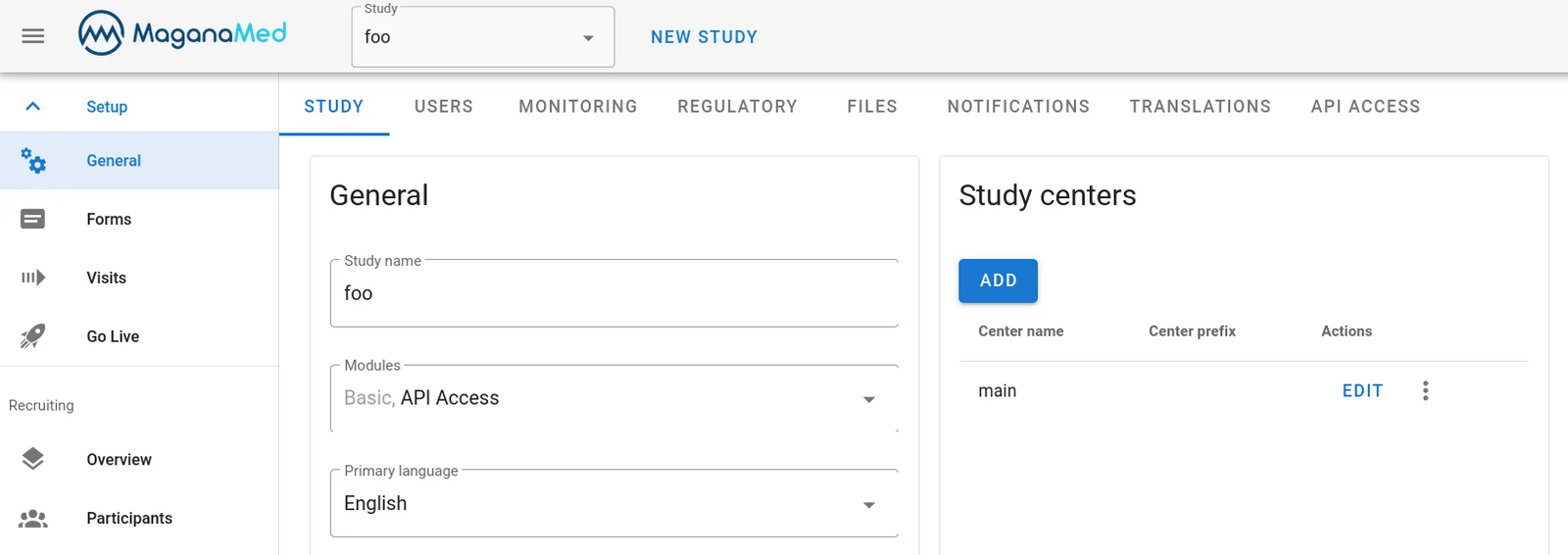
Activating the API-Access module
- Open your Study.
- Go to Setup > General
- In the Study tab open the Modules menu and check the API Access module
Generating an API authentication token
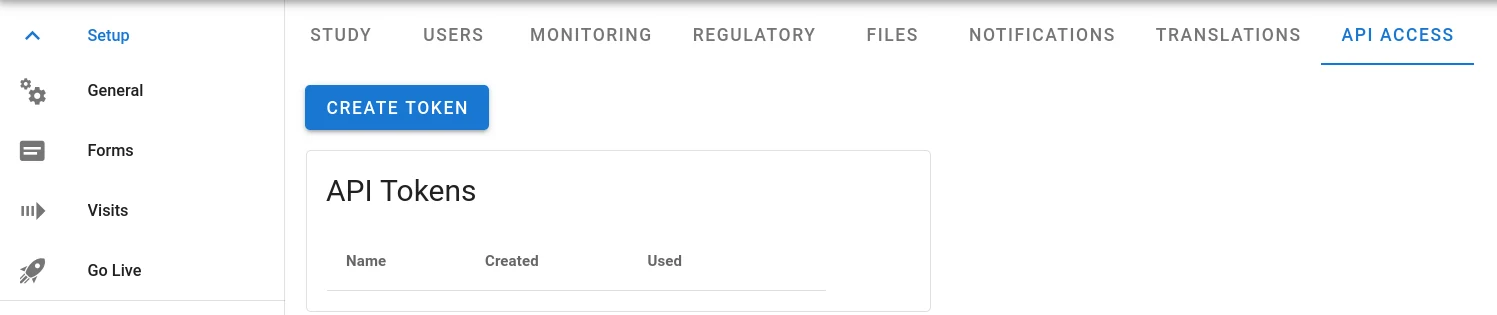
- Under Setup > General, open the tab API token.
- Click on Create token.
- Enter a descriptive name for your token. Access using the token will appear in the audit trail under the name of the token. Typically, the name of the application using the token makes a good token name.
- Click Create token and store the token immediately. It will only displayed once at the time of creation.
Delete an existing API authentication token
Deleting a previously created token is possible in the same menu where it was
created. Just click the X symbol and confirm the deletion by clicking yes.
Caution: Token deletion is irreversible. To re-grant access, a new token must be created and used by the application.
Security
Caution: API access is very powerful! Unlike a normal user, applications using the API are not restricted by user roles or centers but have full access to everything that the API implements across the entire study. Applications using the API are responsible for maintaining any separations required, e.g. center separation, user authentication, access to or blinding of randomisation data, etc.
Never rely on the fact that something is not accessible through the API at the time of implementation of your application. Future extensions of the API will further augment the breadth of access – even for previously created tokens and applications. So you should assume that the API offers access to everything.
Authentication tokens must be kept secure at all times and we urge API users to follow these rules:
- Rotate your API token regularly, at least annually.
- Never embed authentication tokens directly in your front end applications (iOS, Android, or HTML).
- Always store API tokens securely within your back end environment.
- Ensure that authentication tokens do not get committed to code repositories, private or public.
Functionality
At the moment the API supports a small set of common tasks.
- get a list of centers (study sites)
- get participants and their visits and forms, including data
- Write data to participant forms
- Create and delete participants
If you need additional functionality, please get in touch with us.
OpenAPI Specifications
For details on available API functionalities, refer to the OpenAPI specification located at: https://public-api.maganatrial.com/documentation/
API tokens can be submitted by clicking on the green authorize button.
Entity structure
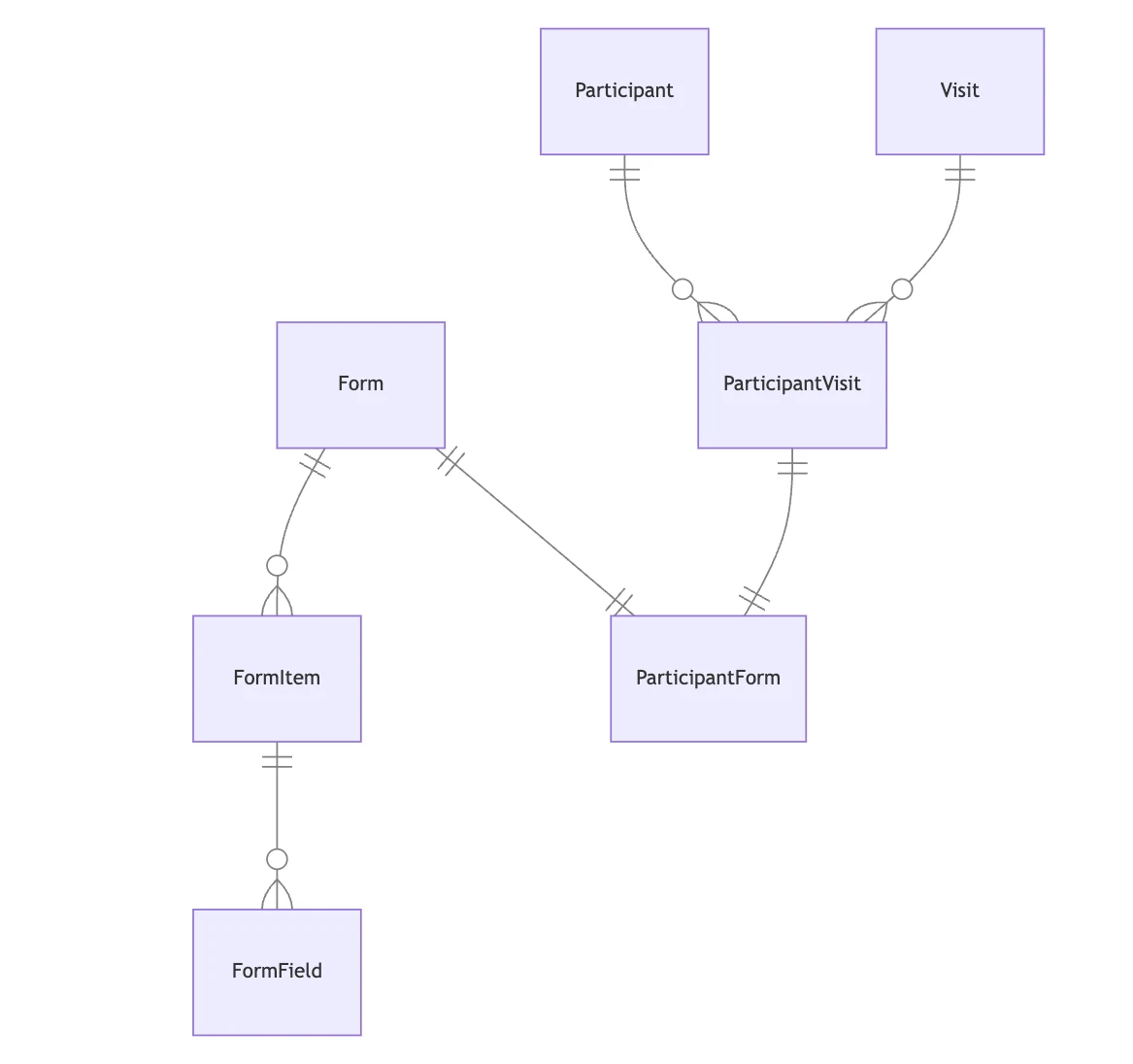
Form:Represents a form that collects data from participants.FormItem:Represents an item within a form, such as a question or text.FormField:Represents the type of data that a form item can hold, such as text, date, or checkbox.Participant:Represents an individual who is part of the study.ParticipantVisit:Represents an instance of a visit which is part of a participant.ParticipantForm:Represents the association between a participant and a form, indicating which forms a participant has filled out.Visit:Represents a study visit.
Data types
Form fields can have the following types:
singleChoice: Encoded withtruefor checked fields.multipleChoice: Encoded withtruefor checked fields.date: Encoded as string in ISO 8601 format (YYYY-MM-DD.time: Encoded as string in 24h format (HH:MM).textarea: Encoded as string.number: Encoded as number e.g.1.5or2.
File uploads
- To upload files through the API, you need to set the
content-typeheader tomultipart/form-data. - You can access uploaded files directly using the static url provided in the response. Don't forget to include your API Token in the Authorization header for authentication.
Example:
https://public-api.maganatrial.com/v1/static/participants/157/uuid.png
Visibility, validations and computed fields
When retrieving a participant form, the API evaluates visibility, validations,
and computed fields and includes them in the response. However, in some
situations, it might be necessary to assess visibility and validation locally
without sending data to the backend. To accommodate this, the forms endpoint
provides a visibility and validation object for questions with visibility
or validation rules. If the advanced entry is set to false, you can
evaluate these rules directly in the frontend. Note that a number field with a
value of 0 is considered an answer and should trigger the display of related
questions.
Rate limiting
Currently, our API doesn't have strict rate limits in place. We trust our users to use our services responsibly. However, we monitor API usage closely. Excessive or abusive usage may lead to API key revocation without warning. This is to ensure fair access for all users.
The endpoint GET /v1/participant-forms/{id} is an exception. Excessive
requests for the same form will be blocked. This is because we log access to
the form data and track access for audit purposes. To avoid unnecessary audit
entries, please use GET /v1/participants/{id}/visits to check if the form
data has changed before requesting it.
Examples
Creating a participant and entering data
Preparation
- Create a new study.
- Enable module API Access and create a token.
- Create a new form and drag a single choice question into the form.
- Create a new visit, click on edit and add the previously created form.
Example Script
Execute the following script and provide the token as environment variable. After executing the script, open the created participant and verify if the first option in the form is selected.
#!/bin/env python3
import os, json, requests

base = "https://public-api.maganatrial.com/v1"

# get authentication token from ENV
# do NOT hardcode it!!
bearer_token = os.environ["TOKEN"]

headers = {
    "Authorization": f"Bearer {bearer_token}",
    "Content-Type": "application/json",
}

# get list of centers/study sites
centers = requests.get(f"{base}/study-centers", headers=headers).json()

# create a new participant
participant = requests.post(
    f"{base}/participants",
    data=json.dumps({"centerId": centers[0]["id"], "identifier": ""}),
    headers=headers,
).json()

# get all visits of the new participant
visit = requests.get(
    f"{base}/participants/{participant['id']}/visits", headers=headers
).json()

# get the first form in the first visit
participant_form = visit[0]["participantForms"][0]
form_id = participant_form["form"]["id"]
participant_form_id = participant_form["id"]

# get form structure
form = requests.get(f"{base}/forms/{form_id}", headers=headers).json()
item = form["items"][0]
field = item["fields"][0]

# import data
data = {"formItemId": item.get("id"), "fields": {}}
data["fields"][field["id"]] = True
response = requests.post(
    f"{base}/participant-forms/{participant_form_id}",
    data=json.dumps({"items": [data]}),
    headers=headers,
)
Questions about Magana Trial Manager?
Try setting up your own eCRF in a free test account, or reach out to our team in Regensburg — we usually reply within one business day.