MaganaScript
MaganaScript is a sandboxed subset of JavaScript. So it uses all the basic syntax rules of JavaScript. For security reasons, only basic language elements are available directly and specific features are provided through custom functions. The MaganaScript engine is used in several places of our software
- Computed fields
- Custom visibility rules
- Custom input validations
- Date window calculations in the visit scheduler module
Aliases
In order to use a value that has been entered into a case report form, you need to give it a unique name -- an alias by which you can then refer to that value.
You can think of aliases as variable names but it is important to remember that aliases are not the same as the variable names defined in the codebook: Aliases are used in computed fields and complex conditions -- variable names from the codebook determine the column names in the data export. We keep these separate intentionally, because an organization may have specific formal requirements for variable names for statistical analysis that may be hard to remember or follow by the staff programming computed fields and conditions in the eCRF. In many cases, it will make sense to use the same identifier for both variable name and alias for a data field but always keep in mind that codebook and aliases live in separate spaces names and may differ.
Aliases always start with a dollar character ($) and can only contain
letters (upper and lower case), digits and the underscore character
(_). Aliases are case sensitive, so $Age and $age are two separate
things.
Aliases should be easy to understand -- i.e. they should be short but clearly
express what they contain. E.g. a good alias for the participant's age at the
time of inclusion would be $inclusion_age, $age_at_inclusion or
$InclusionAge, maybe also simply $age in case no other age is used in the
study. Names that are hard to understand and remember should be avoided -- e.g.
$a, $x, $iage or $aai.
Aliases are defined on the form level. As long as each form is used only
in a single visit, the naming scheme described above is sufficient.
However, many studies use the same form in several visits -- e.g. to
collect follow-up data on the same topic. In that case, it is important
to unambiguously refer to the value in a specific visit. This is
accomplished by defining appropriate visit-aliases such as $Baseline,
$6m_followup or $after_intervention. You can then use composite
aliases in the form $Visit.value, where Visit is the visit alias and
value is the alias for the specific value in a form. E.g.:
$Baseline.age, $3m_followup.cholesterol or
$post_intervention.heart_rate.
If a form is used only in a single visit, no visit alias is required. If a form is used in multiple visits and the visit-alias is not explicitly given, the program will assume that you want the value in the current visit (i.e. the visit in which the computed field is evaluated).
You can define your aliases in the Define Alias section of the
computed fields designer interface. The leading $ character is already
present in the definition form, so you do not need to type it yourself:
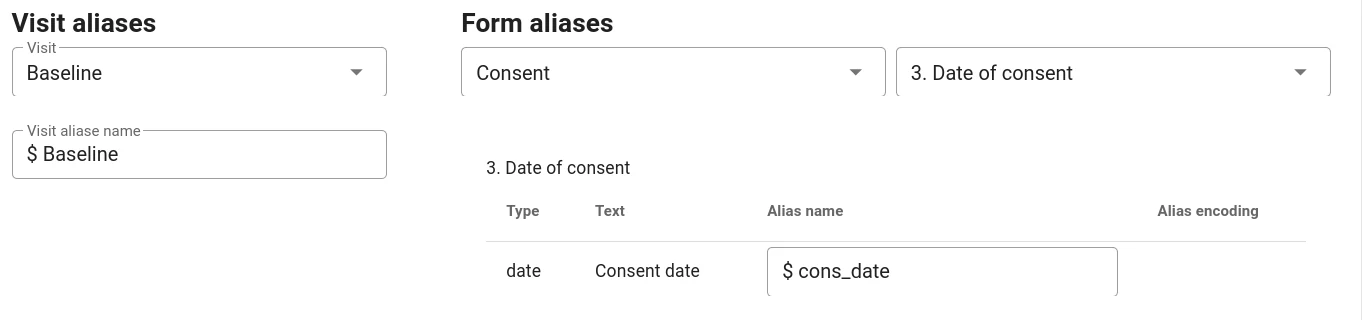
While you can use an alias to read the value of a certain question, there is no way to write to an alias. I.e. you cannot put data into a form by assigning a value to an alias.
Reserved Alias Names
User defined aliases must not start with an underscore ($_) because
this is reserved for system special aliases that allow access to
internal states and values. Currently, the following special aliases are
available:
$_participant_identifier$_participant_id(internal ID of the participant)$_participant_status$_center_name$_center_id(internal ID of the center/site)$_center_timezone$_form_name$_visit_name$_randomized(trueafter randomisation has been done)$_randomization_group$_econsented(true if consent form is complete)
All of these can be used just like any other alias -- i.e. for evaluations in computed fields or as part of advanced visibility rules.
Arithmetics
The following common mathematical operations are currently supported:
- basic arithmetics:
+ - * / - power:
x**y - square root:
sqrt() - modulo operator:
x % y
Evaluation is carried out according to the normal preference rules. I.e. multiplication and division are carried out before addition or subtraction. You can use parentheses to group operations and change the order of evaluation.
Examples
    // area of a circle
    r**2 * 3.141593

    // Pythagorean triangle
    c = sqrt(a**2 + b**2)
Variables
When your computations become more complex it may be useful to define your own variables like this:
    color = "red"
    weight = 75
    dose = 500
And use them:
dose_per_kg = dose / weight
Variable names must start with a letter and may consist of letters, numbers and
the underscore character (_).
Please note that these variables are local -- i.e. they only exist in the computed field where they were defined. They are not accessible in other computed fields or visibility rules etc.
Arrays / Lists
You can combine multiple elements like numbers or strings in arrays:
    colors = ["red", "blue", "green"]
    foo = ["A", 12, "foobar"]
To access elements of an array use the position of the element you want. Element numbering starts at 0.
    colors[0] // returns "red"
    colors[2] // returns "green"
The same method can be used to get specific elements of a string. E.g.:
    foo = "Hello!"
    hello[2] // returns "l"
To join all elements of an array into a string, use the array_join function.
It expects two arguments:
- ARRAY
- The array to join
- DELIM
- The delimiter to use for joining. This can be a single character or a string.
array_join(ARRAY, DELIM)
E.g.
    array_join([1,2,3], ", ")               # "1, 2, 3"
    array_join(["A", "B", "C", "D"], "-")   # "A-B-C-D"
    # Using an alias generated from a catalog question
    array_join($ICD10, ";")
In order to test, if an array contains a specific element, use the array_includes
function. It expects two arguments:
- ARRAY
- The array to search
- ITEM
-
The item to look for
array_includes(ARRAY, ITEM)
E.g.
    array_includes([1,2,3,4,5], 3)              # true
    array_includes([1,2,3,4,5], 9)              # false
    array_includes(["foo", 4, "bar"], "foo")    # true
    array_includes(["foo", 4, "bar"], "FOO")    # false
    array_includes(["foo", 4, "bar"], 0)        # false
Comments
Sometimes you may want to add some explanation or comment to your code.
You can easily do that: All text after a double slash (//) until the end
of line will be ignored during evaluation.
Examples
Convert from centimeters to meters:
$height / 100
Test if a number is even or odd using the modulus operator:
    $number % 2       // true if $number is odd
    $number % 2 == 0  // true if $number is even
Compute cardiac output in visit one:
    // cardiac output
    $V1.stroke_volume * $V1.heart_rate
Absolute weight change since inclusion:
$6m_followup.weight - $Baseline.weight
Percent change in weight since inclusion:
    // percent weight change
    $6m_followup.weight / $Baseline.weight * 100
Percent change in cardiac output from visit one to visit 2:
($V2.stroke_volume * $V2.heart_rate) / ($V1.stroke_volume * $V1.heart_rate) * 100
Body mass index:
$weight / ($height/100)**2
You can use white space for easier human perception but you do not have to. The following are equivalent:
    $weight / ($height/100)**2
    $weight/($height/100)**2
    $weight / ($height / 100) ** 2
Numerical results can be rounded to the desired number of decimals -- e.g. to one:
round($weight / $height**2, 1) // only return one decimal
Logical expressions and conditions
You can use logical comparisons, conditions and if-statements to evaluate and react to certain conditions:
- Test for equality:
== - Test for inequality
!= - Test for greater/less than
> < - Test for greater/less or equal
>= <= - Logical and:
&& - Logical or:
|| - Logical not (negation):
!
Used by themselves, these operators return a value that is either true or false. E.g.
3**3 > 3+3 // true
In order to do something more useful with the result, you can use if-statements:
    if ($Age < 18) {
        "Please use the Schwartz Bedside equation for GFR estimation"
    } else {
        "Use the CKD-EPI Creatinine equation for GFR estimation"
    }
In the above example, the value returned by the computed field is a text (string) defined by the age of that patient. There is also a shorter form to get the same result:
$age < 18 ? "Schwartz Bedside" : "CKD-EPI"
The general format is: CONDITION ? True_Result : False_result
Complex conditions can be constructed using logical operators:
    if ($Age>=65 || ($BMI<18 && $no_appetite=="yes") ) {
        "Check for XXX"
    }
Dates and Times
Sometimes, you may want to work with dates and especially date differences. E.g. to determine the time since inclusion, between visits etc. The system offers a number of functions to do this.
A few words of caution:
Date operations are quite complex by nature. The most important concept to understand is that dates really are points in time (timestamps / datetimes) that contain both the calendar date and a time, even if that is not visible in many cases. E.g. internally, the date 05/23/2021 (MM/DD/YYYY) has the time 00:00 attached to it. In fact, the time information is even stored to sub-second precision. I.e. the current date will be something like "2021-07-04T13:51:30.595Z".
Furthermore, such a date refers to UTC (Universal Time Coordinated) -- formerly known as GMT (Greenwich Mean Time), not your local time zone. This is important to remember, especially if your study centers are located in different time zones.
Carefully test all date operations with lots of examples including edge cases such as "the same day", "an hour later", etc.
The following operations are supported:
date_now()-- date and time nowdate_diff($date1, $date2, UNIT)-- the difference between two datesdate_add($date1, K, UNIT)-- add k units to a datedate_subtract($date1, K, UNIT)-- subtract k units from a datedate_format($date1, FORMAT)-- pretty print a date in the desired formatdate_format_tz($date1, FORMAT, TIMEZONE)-- pretty print date after converting to TIMEZONE
Time zone names look something like this: "America/New_York", "Asia/Tokyo" or "Etc/GMT+2". Valid timezone names are standardized and a complete list can be found here.
where
-
K is a number
-
UNIT is one of "second", "minute", "hour", "day", "week", "month", "year"
Keep in mind, that a month may have different numbers of days -
FORMAT is a string (text) describing how the elements of a date are to be formatted.
E.g.DD.MM.YYYY HH:mmfor the format commonly used in most of Europe orYYYY-MM-DDfor data in ISO format.
Valid placeholders are:YYYY-- four digit yearYY-- two digit yearM-- monthMM-- two digit monthD-- dayDD-- two digits dayh-- hours (12 hour format)hh-- two digit hours (12 hour format)H-- hours (24 hour format)HH-- two digit hours (24 hour format)m-- minutesmm-- two digit minutess-- secondsss-- two digit secondsa-- am/pmd-- numeric day of the week (1 = Monday)dd-- day of the week, two letters (e.g. "Tu")ddd-- day of the week, three letters (e.g. "Tue")dddd-- day of the week in full (e.g. "Tuesday")/ . - : , ; \_ + !"-- allowed delimiters for date and time
Date Examples
Results of each operation are given in the comment "//".
Get the current date and time:
    date_now()
    // 2021-07-04T14:27:30.595Z
    date_format(date_now(), "DD.MM.YYYY HH:mm")
    // 04.07.2021 14:37
    date_format_tz(date_now(), "DD.MM.YYYY HH:mm", "EUROPE/BERLIN")
    // 04.07.2021 16:37
How long ago was the baseline visit?
    date_diff(date_now, $Baseline.date)
    // 482887476
By default, the result above is in milliseconds! So let's make that a little easier to understand:
    date_diff(date_now(), $cons_date, "hour")
    // 134
    date_diff(date_now(), $cons_date, "day")
    // 5
    date_diff(date_now(), $cons_date, "week")
    // 0
Now, let's manually check that:
482887476 ms / 1000 / 60 / 60 / 24 = 5.588975 days
Everything is rounded to the full week/day/hour etc. So when you last saw your participant yesterday at 10:00 a.m. and it is now 8:00 a.m., the time difference in days is 0! Keep that in mind, when setting up date operations.
To gain more control, you could compute the difference in fractional days:
    date_diff(date_now(), $cons_date, "hours") / 24
    // 5.583333333333333
    date_diff($cons_date, date_now(), "hour") /24
    // -5.58333333333333
    round(date_diff(date_now(), $cons_date, "hour") /24, 1)
    // 5.6
Practical application: Checking date windows
Let's assume you want to check, if a visit actually happened in the time window required by your protocol:
- Inclusion
- 1st Follow-up must take place 7-14 days after inclusion
- 2nd Follow-up must take place 30-40 days after 1st Follow-up
You have a form Visit date that is assigned to all visits and ask for the visit date. Now we want to check if the visit window was obeyed and issue a warning otherwise.
First, we define a visit alias for each of them:
- Inclusion:
$V0 - 1st Follow-up:
$V1 - 2nd Follow-up:
$V2
and assign the alias $vdate to the date field in the Visit date form.
Now we can add a computed field to the visit date form that checks the time differences and issues the warning message:
window_ok = true
if ($_visit_name == "1st Follow-up") {
    window_ok = 7 <= date_diff($vdate, $V0.vdate, "day") <= 14
} else if ($_visit_name == "2nd Follow-up") {
    window_ok = 30 <= date_diff($vdate, $V1.vdate, "day") <= 40
}
window_ok ? "" : "<b style='color:red'>Visit date is outside the allowed time window!</b>"
Times
As of writing, there are no explicit time functions. However, the date*
functions described above actually work on datetimes. So in order to e.g.
calculate time differences, you can expand the time values to complete
datetimes and then use the date* functions:
# $t0 is the Starting Time (entered in a form)
# $t1 is the Ending Time (entered in a form)

# attach an arbitrary date and computethe difference
dd = "2000-01-01T"
delta_t = date_diff(dd + $t1, dd + $t0, "minutes")
Strings
Sometimes you want to convert an entire string to upper or lower case – e.g. for easier comparison to an expected value. You can do that like this:
lower($drug) == "ibuprofen"
or
upper($drug) == "IBUPROFEN"
In order to get the letter at a specific position of a string you can use indexing:
    foo = "ABCDEFG"
    foo[2]  // "C"
remember that indexing starts at 0.
You can also concatenate several strings into one:
    foo = "ABCD"
    bar = "efg"
    "letters: " + foo + bar   // "letters: ABCDefg"
This can be useful to construct the output of computed fields from several aliases or computations:
    result = "<ol>"
    result += "<li> Visit 1:" + $v1.weight * " kg </li>"
    result += "<li> Visit 2:" + $v2.weight * " kg </li>"
    result += "</ol>"
    result
Regular Expressions
Regular expressions represent a way to test if a string follows certain
composition rules or contains a specific pattern. Function regex_test
takes a two arguments:
- A string to be tested
- A regular expression definition.
The function returns true if the regular expression matches the string,
false otherwise. The syntax of the regular expression follows the definition
for ECMA Script (Javascript).
A regular expression is delimeted by two slashes (/) between which the
pattern is contained. The pattern can contain normal text and special tokens.
E.G. /foo/ matches any string that contains the substring "foo" and
/foo.*bar/ matches "foobar", "foo bar" or "foo and bar" etc.
Important RegEx tokens
| token | Description |
|---|---|
. |
Any character |
\. |
A dot (.) |
[abc] |
Any of the characters a, b and c |
[a-zA-Z] |
any letter of the alphabet, upper or lower case |
[0-9] |
a digit |
\d |
a digit |
[aeiouAEIOU] |
a vowel |
[^aeiouAEIOU] |
not a vowel |
\n |
newline |
\r |
carriage return |
^ |
Beginning of string or line |
$ |
End of string or line |
\b |
Word boundary |
* |
zero or more repetitions of the token before it. E.g. none or many X: X* |
+ |
one or more repetitions of the token before it. E.g. one or many t: t+ |
? |
zero or one of the token before it |
{5,} |
five or more repetitions of the token before |
{0,5} |
up to five repetitions of the token before |
{3,5} |
tree to five repetitions of the token before |
{5} |
exactly five repetitions of the token before |
Practical use
Regular expression matching can be applied to strings that are given verbatim in the function or that have been defined elsewhere. This also includes aliases. Some examples:
    regex_test("MaganaMed", /aga/)  // true

    color = "green"
    regex_test(color, /re/)         // true

    regex_test($other_condition, /infection/)
In the following, we show a few practical examples that illustrate what you can accomplish with regular expressions.
-
Contains the word color in American or British English:
/colou?r/matches "favorite colour" as well as "color coded"
-
Exactly matches the word color in American or British English:
/^colou?r$/matches "color" and "colour" but not "color code" or "dark color"
-
Contains color in US or British spelling, even at the beginning of sentence:
/[Cc]olou?r/ -
Match
Googleallowing it to be stretched with arbitrary many o's in the middle:/Go{2,}gle/ -
Match a string that adheres to the pattern
dddd.ddd-XX/dddd, wheredis a digit andXis an upper case letter:/^\d{4}\.\d{3}-[A-Z]{2}\/\d{4}$/ -
Naive (and incomplete) check, if string is an email address:
/^[a-zA-Z.+\-]+@([a-zA-Z\-]+\.)+[a-zA-Z\-]+$/ -
Slightly better email check:
/^\S+@(\S+\.)+\S+$/ -
A valid weekday
/^(mon(day){0,1}|tue(sday){0,1}|wed(nesday){0,1}|thu(rsday){0,1}|fri(day){0,1}|sat(urday){0,1}|sun(day){0,1})$/ -
German ZIP code (5 digits)
/^\d{5}$/
For more token definitions and to try out regular expressions interactively, go to rexex101.com and select ECMA Script (JavaScript).
Advanced operations
Let's assume you have a table for rating different aspects of a medical device:
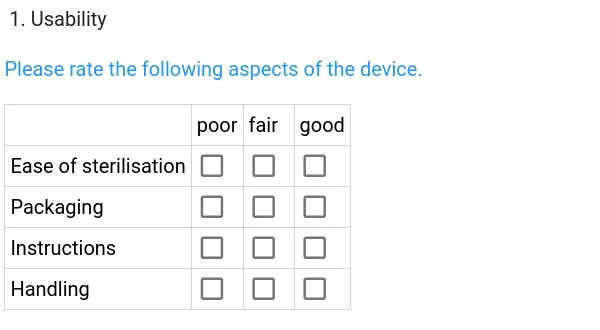
We want to compute a rating score where each "poor" answer is worth 0 points, "fair" yields 1 point and "good" 2. In order to use these variables, we need to define aliases in our computed field:
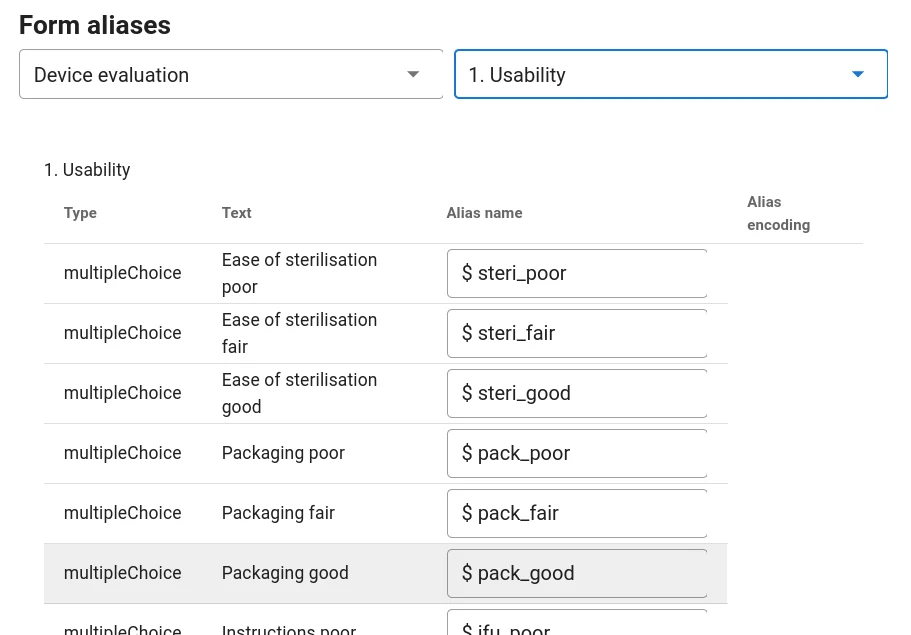
Next, we need a way to get different values depending on the category (poor/fair/good). We can use a short expression that works very similar to an if statement:
    $steri_fair ? 1 : 0     // returns 1 if steri_fair==true and 0 otherwise
    $steri_good ? 2 : 0     // returns 2 if steri_good==true and 0 otherwise
Now, we can set up an expression to compute the score:
    score = 0       // initialize score with zero
    score = score + $steri_fair ? 1 : 0
    score = score + $steri_good ? 2 : 0
    score = score + $pack_fair ? 1 : 0
    score = score + $pack_good ? 2 : 0
    score = score + $ifu_fair ? 1 : 0
    score = score + $ifu_good ? 2 : 0
    score = score + $handling_fair ? 1 : 0
    score = score + $handling_good ? 2 : 0
    score // return the value of the score
Here, we are using a new concept: In the first line, a local variable is defined. Please note that the variable score does not start with a dollar character. That means that it does not refer to anything entered into a form but is only used in the context of the computed field. In the example, it is used to set the score to zero before we start checking conditions. The subsequent lines test a series of conditions and return the respective value. This value is then added to the score and the value assigned back to the score variable (+= operator). Finally, the last line evaluates to the score at that point and returns this as the value of our computed field.
The above code can be written in a simplified way, by using the += operator: Instead of explicitly adding something to the score and then assigning the result back to the score variable, += does it in one step:
    score = 0   // initialize score with zero
    score += $steri_fair ? 1 : 0
    score += $steri_good ? 2 : 0
    score += $pack_fair ? 1 : 0
    score += $pack_good ? 2 : 0
    score += $ifu_fair ? 1 : 0
    score += $ifu_good ? 2 : 0
    score += $handling_fair ? 1 : 0
    score += $handling_good ? 2 : 0
    score       // return the value of the score
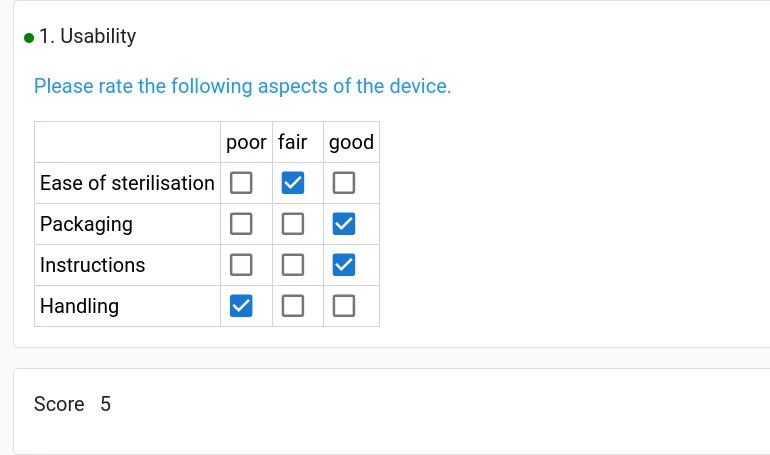
For all these approaches, the result is the same and looks like this:
Questions about Magana Trial Manager?
Try setting up your own eCRF in a free test account, or reach out to our team in Regensburg — we usually reply within one business day.