Data export
On this page (5)
Data export is available at Data & Analysis > Export. This functionality is only accessible to users who's role includes Export permission.
Clicking Generate at the bottom of the export screen will generate a zip
archive that contains one CSV file for each form or the study, by default.
Archive generation can take a while, depending on the size of your study.
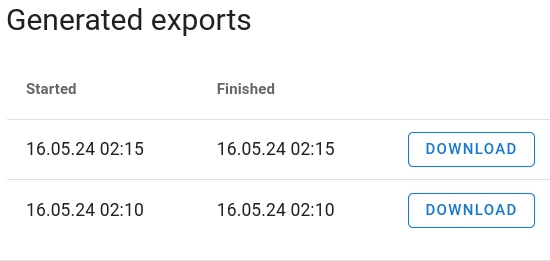
Once your export archive is ready, it will appear at the top of the list in the Generated Exports box:
Caution: Exports generated by a user will remain accessible in his export list even if permissions change at a later time point. That means that e.g. removing access to a study center or to randomization data will not affect any data the user has exported before the permission change.
Filtering
Filtering allows you to restrict the scope of the data export. Most of the time, it is advisable to run a full export and handle any filtering in your statistics software, but in some cases, you may wish to apply one of the following filters:
- Center
- Select the study centers to include in the export.
- Forms
- Uncheck Export all forms and select the individual forms to include in the export.
- Codebook language
- Select the codebook language to use for the export. Typically, you want to leave this at the primary language of your study.
- Date
- If you set a date here, only forms finished before this date will be included.
Options
- Format
- By default, the export will contain one
CSVfile per form (setting Separate: files). If you select Joint file with prefix, all individual forms will be combined in one very wide output file. In order to indicate which form a data column originates from, the system will add a prefix to each column. These prefixes must be set in the box on the right side of the export screen before starting the export.
You can create separate files for each form or create a joint file which includes all selected forms. If you export the data into one joint file, you will have to set a prefix for each form on the right side of the export screen.
Additional data
You can tell the system to include one or more of the following pieces of data which are not included by default:
- Biosamples
- Codes and life cycle of registered bio samples
- Form PDFs
- One PDF file per filled form. Also includes metadata such as audit trail, Notes, Queries and verifications. Selecting this option will slow down export considerably – depending on the number of forms and participants, generating the export can take a few hours. So only select when needed.
- Randomization
- Randomization of participants to study arms. Only available with View Randomization permission. Caution: access to this data will break blinding.
- Audit Trail
- If checked, the export archive will contain two csv files containing the audit
trail:
audit-trail-general.csvcontains the main audit trail, i.e. data entry, data changes, opening form data etc.audit-trail-form-structure.csv: this file contains all events with respect to editing the form structure rather than data. E.g. Adding questions, changing the wording, etc. - Deleted participants
- You can exclude or include participants who are marked as deleted from the export.
Exporting the identity log
Users with permissions export and identity can download the identity log for the study centers they have these permissions for. The identity log is not part of the normal export archive, but must be downloaded, separately for each center.
Caution: The identity log contains sensitive personal data and must be handled appropriately to prevent unauthorized access.
Data Format
The export data comes in a zip archive that contains a number of different files:
codebook.xlsx
participants.csv
participants-randomization.csv
study-participant-forms.csv
*.csv
The CSV format uses semicolons (';') for column separation and commas as
decimal separators(',').
These CSV files can easily be imported into all kinds of statistical
software, databases, and spreadsheets with the correct configuration.
Caution: While spreadsheet programs like Microsoft Excel or LibreOffice will apparently open these files without a problem, it is dangerous to work with data in spreadsheets because these programs will try to infer data types from cell content and silently modify data during import.
Example: If a cell in csv file contains the string 'oct8' which refers to a
gene, Excel will assume it's a date and change it to 'october 8th' or '10/8'
etc. depending on your format settings. This will breach data integrity!
Here a short description of files present in the export archive:
- codebook.xlsx
- One tab per form. Contains information on the question type, question text, available answers and their assigned variable names and variable coding.
- participants.csv
- Mapping of participant ids to centers and survey identifiers
- participants-randomization.csv
- mapping of participant id and center to randomization result (study arm) as well as time of randomization. Only present if the exporting user has permission View Randomization because it breaks blinding.
- study-participant-forms.csv
- Information about lock and delete dates of forms.
- joined.csv
- Present if format Joint file with prefix was selected. Each row is an observation. Different forms are joined side by side. So these tables can get very wide. Column prefixes indicate the origin of a column.
- audit-trail.general.csv
- This file contains the main audit trail – views, edits, deletions, permission changes etc.
- audit-trail-formstructure.csv
- This file contains all audit trial events regarding changes to the structure and content of the forms used in the study.
- *.csv
- One file per form containing all entered data. One row per observation.
Form exports always start with the following columns:
participant_identifier
center_name
created_at
started_at
finished_at
visit_name
form_index
diary_date
All subsequent columns represent the different questions of each form.
If a form is included in multiple visits, these copies result in separate
rows in the file. I.e. to uniquely identify a data record, you need to use
participant_identifier, center_name and visit_name as a composite key.
If you have forms that can be added multiple times, you also need to include
form_index in the composite key. If the form is part of a patient diary,
diary_date must be added to the key.
The data only includes forms that have at least be opened but not necessarily finished.. Forms that were never opened will not appear in the export.
The time stamps started_at and finished_at will allow you to discern
finished forms from those that have only been started but never finished.
Questions about Magana Trial Manager?
Try setting up your own eCRF in a free test account, or reach out to our team in Regensburg — we usually reply within one business day.