Verification management
Under Recruiting > Verifications you can get a list of all verifications, signatures etc. in your study.:
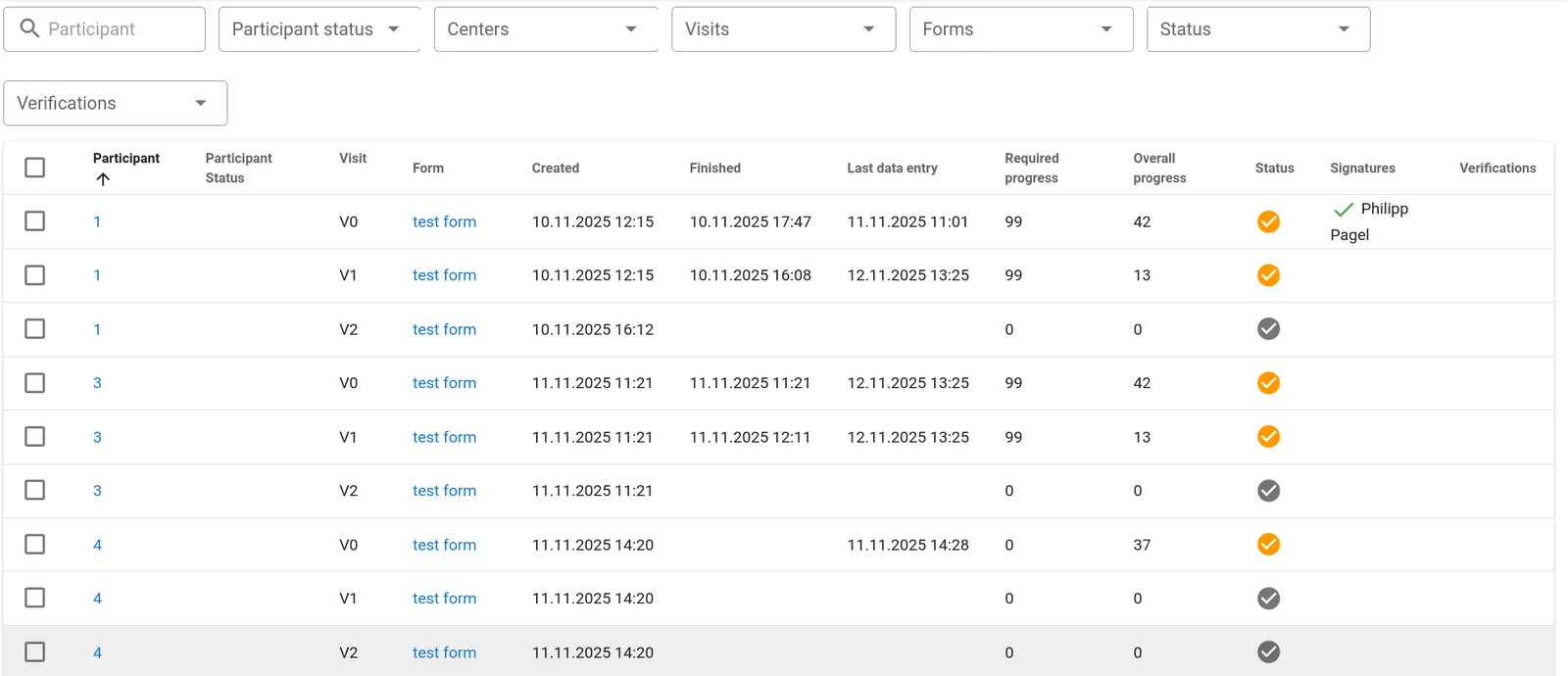
The list contains one row per participant, visit and form and there are several columns showing various pieces of information that are useful for monitors and study managers.
It can also be used for bulk operations: Select one or more forms by ticking the box in the first column and select your bulk operation. The operation will be executed on all selected forms.
You can filter the list by various criteria at the top of the page. The verification list can also be sorted by any of the following criteria by clicking on the respective header. Clicking again will reverse the sorting order:
- Participant ID
- Participant status
- Visit
- Form name
- Form creation date
- Form finish date
- Date of last data entry
- Progress/completeness wrt mandatory questions (percent)
- Overall progress/completeness (percent)
- Form status
- Signatures
- Verifications
Clicking on the participant ID will directly take you to the participant view for the respective patient. Clicking on the form name takes you directly into the verified form of the participant.
The system will remember filter and sorting settings as long as you just click on items in the view and return to the overview using the Back button of your browser. Opening other menus in the system and returning to the verification list by clicking Verifications in the menu will reset all filters.
Your role in the study and the permissions associated with it determine what kind of access you have: Verifications can only be set and removed by roles that have the verify permission. Anyone with view permission can see verifications. Users only have access to verifications in their own center(s).
Questions about Magana Trial Manager?
Try setting up your own eCRF in a free test account, or reach out to our team in Regensburg — we usually reply within one business day.